Vector Shift Assessment
VectorShift is a YC-backed startup building an AI pipeline platform. Their take-home assessment asked candidates to extend an existing React + FastAPI node editor across four parts: abstract repetitive node code, apply meaningful styling, add dynamic variable logic to the Text Node, and wire the frontend to a backend DAG validator.
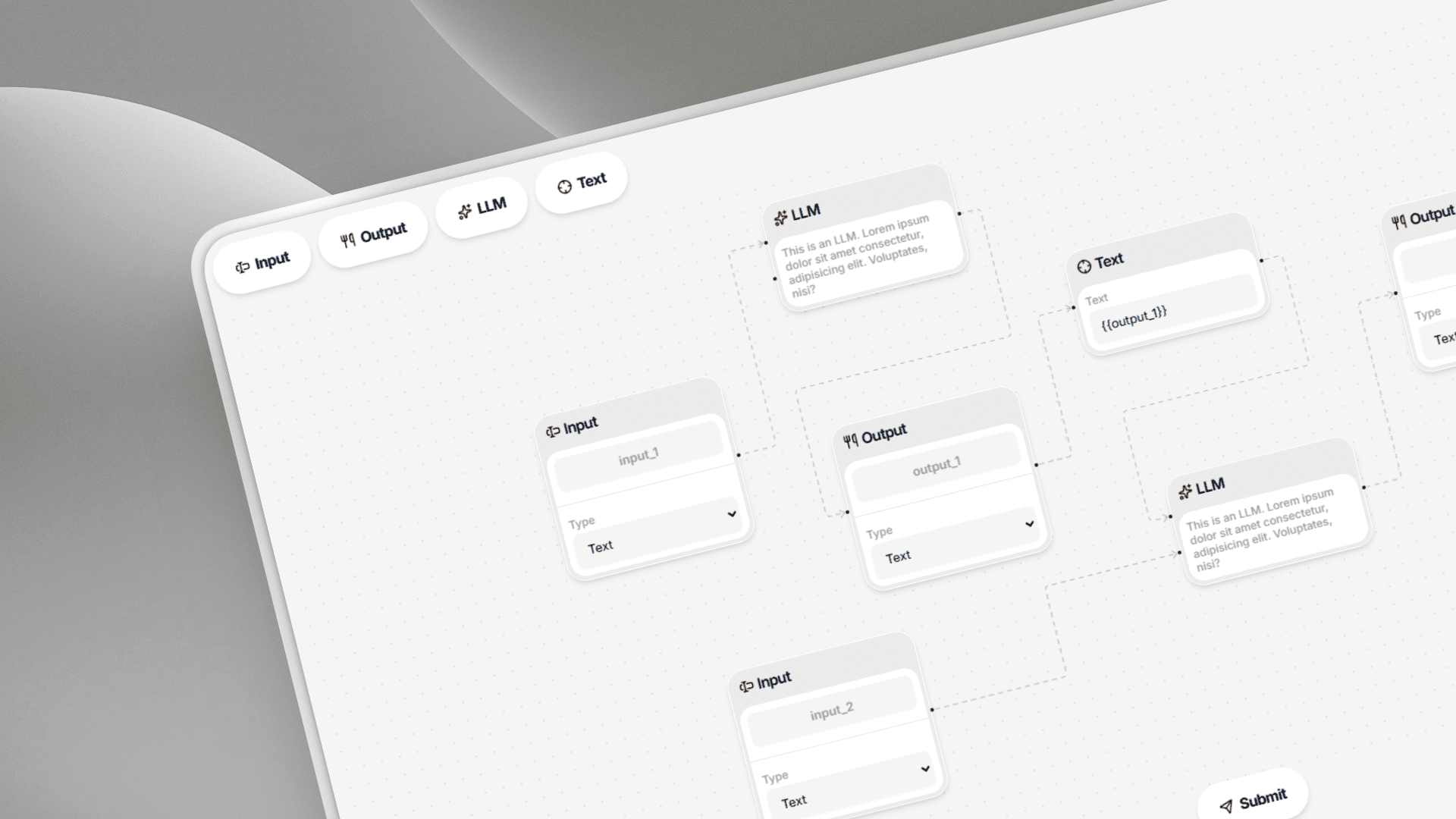
A Scalable Node-Based Pipeline Editor Built With React and FastAPI, Designed as a System Rather Than a Series of Isolated Tasks
This project was part of the VectorShift frontend technical assessment — a multi-part challenge to build a fully functional, scalable pipeline editor. Rather than solving each part in isolation, I approached the entire assignment as a system design problem, optimizing for scalability, maintainability, and developer experience from the start.
The Four Pillars of the Assessment
The assignment was structured across four distinct areas:
- Node abstraction — eliminate duplication and create a reusable foundation
- UI styling — build a consistent and aesthetic styling
- Dynamic text node logic — support real-time variable parsing and auto-wiring
- Backend DAG validation — validate pipeline graph structure via FastAPI
Each part surfaced a different layer of engineering challenge. Together, they formed a cohesive system design problem rather than a checklist of features.
Copy-Paste Architecture, Zero Consistency, and No Graph Validation — The Starting Point Was Fragile By Design
Before any improvements, the codebase had structural issues baked in at every layer. Understanding the exact nature of each problem was the first step toward designing the right solutions.
Node Duplication Was the Root Problem
Nodes were created by copy-pasting existing files. The duplication wasn't superficial — it ran deep:
- State logic (
useState) repeated across every node - Event handlers (
handleNameChange,handleTypeChange) duplicated verbatim - Layout and structure re-implemented file by file
- Inline styles and
<Handle />usage scattered without a single source of truth
Adding a new node type meant copying an existing file and modifying a handful of values — but every copy added maintenance debt. The more nodes, the harder the codebase became to change.
Styling Had No Central Authority
Each node managed its own visual styles. There was no shared design system, no token layer, and no mechanism to ensure visual consistency across node types. Any future style change would require touching every node file individually.
Text Nodes Were Static
The text input didn't resize, didn't parse content, and had no awareness of the broader graph. There was no mechanism to detect {{variableName}} patterns, create handles dynamically, or wire connections automatically.
The Backend Was Disconnected
There was no integration between the frontend pipeline and the backend. No validation of graph structure, no insight into node or edge counts, and no way to verify whether the pipeline formed a valid Directed Acyclic Graph (DAG).
Eliminating 80–90% of Duplication Through a Base Node Component and a Centralized Node Registry
The core insight driving Part 1 was simple: all nodes shared the overwhelming majority of their implementation. The differences between node types were minimal — a label here, a handle position there, a select field instead of a text field. Everything else was identical.
What Actually Varied Between Nodes
- Label (
Input,Output,LLM, etc.) - Handle positions (left, right, count)
- Default field naming conventions
- Minor field configuration (e.g., dropdown options)
That's it. Everything else — state logic, handlers, layout, handle rendering — was shared. The solution had to reflect that reality.
The Base Node + Registry Architecture
I designed a Base Node component that acts as a universal layout skeleton, paired with a Node Registry — a centralized configuration object that defines each node type declaratively.
The registry schema captures:
- Node type identifier
- Display label
- Handle configurations (count, position side, type)
- Field metadata (field name, type, default value)
Each node is now rendered by feeding a registry entry into the Base Node. No new component file. No duplicated logic. Just a new config object.
The Handle Positioning Challenge — A Design Principles Moment
This part surfaced an important decision. Originally, handles were hardcoded with custom inline styles like top: 33% or top: 66%. During abstraction, the obvious shortcut was to include a styles field directly in the registry schema.
I chose not to.
UI styling must not live in the data layer. The registry is a data structure — it describes what a node is, not how it looks. Handle positioning is a layout concern, and layout concerns belong in the component layer.
The final approach computes handle positions dynamically inside the Base Node, distributing them evenly based on handle count. No repeated styling configs. No pixel values in the registry. Clean separation of concerns that scales to any number of handles automatically.
Outcome
- ✓ Duplication eliminated across all node types
- ✓ New nodes created via a single registry entry
- ✓ Centralized logic — one change propagates everywhere
- ✓ Handle positioning fully dynamic and config-free
- ✓ Five new node types added as proof-of-concept, each in minutes
A Modern SaaS Aesthetic With Neumorphic Depth, Scoped Deliberately to the Node Component as the Assessment's Core Visual Surface
Part 2 was about making the interface visually coherent without over-engineering it. The goal wasn't a full product redesign — it was a polished, professional node UI that would hold up against real SaaS tooling.
Design Research and Direction
After completing all functional work, I explored design references across:
- Dribbble and Behance — for visual direction and current aesthetic trends
- Competitor tools — n8n, Make, and Zapier for pipeline UI patterns
The final design direction landed on:
- Light theme — clean, readable, minimal visual noise
- Subtle neumorphic depth — soft shadows for card-like dimensionality without skeuomorphism
- Structured SaaS aesthetic — consistent with the visual language common in 2026 tooling
The Plain CSS Decision
I chose plain CSS over Tailwind. This wasn't a preference — it was a scope-appropriate call:
- The project used Create React App, which has no native Tailwind support
- Adding Tailwind would require manual webpack configuration
- The assessment scope was limited — plain CSS was faster, sufficient, and introduced no unnecessary complexity
Deliberate Scope Boundary
One intentional decision worth documenting: I did not redesign the broader application chrome or make the app responsive. Both would have been over-engineered for this context. The node component was the core deliverable — everything else was refined only to a presentable baseline.
Good scoping is itself a design decision. Knowing what not to build is as important as knowing what to build.
Real-Time Variable Parsing, Auto-Resizing Inputs, and Automatic Edge Creation — the Most System-Heavy Part of the Assessment
Part 3 required building a Text Node that could detect {{variableName}} patterns as the user typed, dynamically render handles for matching nodes, and automatically wire edges into the graph. This went well beyond UI — it required designing a reactive state architecture.
Feature 1 — Auto-Resizing Input
The text field height updates dynamically on every input change by reading the element's scrollHeight. As content grows, the node grows with it. No overflow. No hidden text. No fixed-height constraints.
Feature 2 — Variable-Based Connection System
Typing {{input}} into a Text Node should:
- Create a new handle on the left side of the node
- Automatically wire an edge to the node named
input - Update in real time on every keystroke
This required a purpose-built system — not just a regex check.
System Architecture
Specialized name fields were introduced to flag certain inputs as structural identifiers. This differentiates node names (which can become variable sources) from regular content fields.
A variable registry in Zustand maintains a live map of variable state:
{
  variableName: {
    source: nodeId,
    targets: [nodeIds...]
  }
}
Smart update logic via updateNodeField handles two distinct code paths:
- Name field changes → update variable sources in the registry
- Content field changes → parse for
{{variable}}patterns, map targets, rebuild edges
Dynamic handle rendering — each node tracks a variablesUsed[] array. The Base Node reads this array to render left-side handles at runtime, keeping the graph state and the UI in sync.
Outcome
- ✓ Real-time variable parsing on every keystroke
- ✓ Handles appear and disappear as variables are added or removed
- ✓ Edges created and destroyed automatically
- ✓ State architecture scales cleanly beyond the Text Node use case
Learning DAG Theory and DFS Cycle Detection From Scratch, Then Shipping a Working Validation Endpoint in FastAPI
Part 4 closed the loop between the frontend pipeline editor and the backend — validating whether a submitted pipeline forms a valid Directed Acyclic Graph.
The Learning Moment
DAGs and cycle detection were new territory going in. Rather than treating this as a blocker, I treated it as a quick learning sprint — studied the concepts through focused lectures, worked through the algorithm logic, and came out the other side with a clean implementation.
The algorithm turned out to be far simpler than its name suggests.
What a DAG Actually Is
A graph G = (V, E) is a valid DAG if and only if it contains no cycles. Every node can be reached through directed edges, but no path ever loops back to its origin. In a pipeline context: data must flow forward, never in circles.
The Algorithm
Cycle detection via Depth-First Search (DFS):
- Build an adjacency list from the edge array
- Run DFS traversal across all nodes
- Track two sets per traversal:
visitedandinStack - If a node is encountered that is already
inStack— a cycle exists
No cycle found after full traversal → valid DAG.
The /pipelines/parse Endpoint
The FastAPI endpoint was extended to:
- Accept a
nodesarray and anedgesarray - Count both
- Run DFS cycle detection
- Return
{ num_nodes, num_edges, is_dag }
Frontend Integration
On pipeline submission, the frontend sends the full graph to /pipelines/parse and displays the response in a styled alert modal — showing node count, edge count, and DAG validity status clearly and immediately.
Every Core Requirement Delivered — With a System Architecture That Scales Well Beyond the Assessment Scope
The assessment wasn't just completed — it was approached as a foundation for a real, extensible product. Here's what shipped:
Delivered Features
-
Base Node + Registry system — A single
BaseNodecomponent renders any node type from a config entry innodeRegistry.js. Adding a new node requires no new component file, just a new registry object with title, fields, and handles defined. Five new node types were added to demonstrate this. -
Centralized styling — All node styling lives in the Base Node component. Every node type inherits the same visual foundation automatically. Any future style change propagates everywhere with a single edit.
-
Dynamic Text Node — Auto-resizes vertically via
scrollHeight. Parses{{variableName}}patterns on every keystroke. Matching variable names trigger a new<Handle>on the left side and an automatically created edge to the source node. -
Variable registry in Zustand — A
variablesstate map tracks each variable name against its source node ID and an array of referencing Text Nodes.updateNodeFieldhandles both name changes and content changes with distinct logic paths. -
DAG validation endpoint —
/pipelines/parseaccepts nodes and edges, counts both, runs DFS cycle detection, and returns{ num_nodes, num_edges, is_dag }. -
Alert modal — Displays pipeline validation results on submit — node count, edge count, and DAG status — in a styled, readable format.
-
Consistent node UI — Light theme, subtle neumorphic depth, consistent spacing and typography across all node types.
The system delivered isn't just feature-complete — it's designed to grow. New node types, new field types, new validation rules — all can be added without restructuring the architecture.
What Was Learned, What Should Be Fixed Next, and Why Process Documentation Matters as Much as the Code Itself
Every project surfaces learnings at multiple levels — technical skills, system design instincts, and process habits. This one was no different.
New Technical Ground Covered
- React Flow — New going in; developed hands-on understanding of nodes, handles, and edges that goes well beyond the documentation
- DAG + DFS cycle detection — Learned and implemented from scratch under assessment conditions
- Zustand — Refined understanding of structuring non-trivial, multi-concern global state
Short-Term Improvements (v2)
- Fix edge cases in dynamic handle positioning for the Text Node
- Refactor
updateNodeFieldto improve readability and maintainability - Add proper error handling in
/pipelines/parse
Long-Term Improvements
- Add real computational functionality to node types
- Full UI redesign beyond the node component
- Make the application responsive
- Agent-driven pipeline generation — prompt → pipeline
The Biggest Miss: Process Documentation
The most significant gap in this project wasn't technical — it was documentation of thinking during development.
Every decision was intentional: identifying duplication, designing the registry, structuring variable state, keeping dependencies minimal. But without a running dev log, reconstructing the narrative after the fact took more effort than it should have.
Good engineering isn't just building systems — it's also documenting the reasoning behind them. The code tells you what was built. The documentation tells you why. Both matter.
If starting again: maintain a running dev log alongside development, capturing decisions and trade-offs in real time rather than reconstructing them afterward.
The stuff I keep Closest to myself






Freshpicksfrommycorneroftheinternet

Be Dumb